

I have spent years observing players speed through account creation without understanding what happens backstage incaspincasino.de.com. The login page and registration sequence at a site like Incaspin Casino are not just doorways. They are designed systems that equilibrate speed, legal compliance, and personal data protection. I want to walk you through precisely how these tools work so you are able to navigate them with confidence.
The inner workings of the login gateway
When I visit the login page and enter my credentials, I am starting a challenge-response protocol. The password I type never travels as plain text. It gets hashed client-side or encrypted via TLS before the server compares it against the stored hash. The system never actually sees my password in readable form. It only knows whether the mathematical transformation of my input matches the stored transformation.
Rate limiting is the invisible guardian here. If I enter incorrectly my password five times in rapid succession, the endpoint begins delaying responses exponentially. This algorithmic throttling hinders brute-force bots that use thousands of combinations per second. For me, a legitimate user, a short lockout timer simply encourages me to use the password reset tool. The login gateway distinguishes human rhythm from machine aggression.

I also gain from session token generation. Upon successful authentication, the server issues a JSON Web Token or a session cookie with a unique identifier. My browser saves this token and presents it with every subsequent request. The server validates the token’s signature and expiry without re-querying the full credentials. This stateless verification ensures my gameplay smooth while enforcing strict access control.
Two-Factor Authentication for Enhanced Security
Enabling two-factor authentication transforms my login routine into a multi-factor verification process. After I submit the correct password, the platform requires a second proof of identity. Typically, this is a time-sensitive one-time password created by an authenticator app on my phone. The algorithm synchronizes a shared secret during the initial setup, and then my device generates codes that change every thirty seconds.
I understand that the secret key is saved locally on my device, not on a remote SMS server. SMS-based codes are exposed to SIM-swapping attacks. Authenticator apps separate the second factor from my phone number. Even if an attacker steals my password through a keylogger, they cannot log in without direct access of my unlocked device. The mathematical synchronization between my app and the server stays airtight.
Backup codes are the safety net I must store offline. The platform generates a set of single-use recovery tokens during setup. Each code can substitute for the authenticator exactly once. I record these codes and store them in a physical safe. If I misplace my phone while traveling, I can still reach my account without reaching support. The system invalidates each used code immediately, stopping replay attacks.
Credential Reset and Login Reinstatement Tools
Forgetting my password does not mean giving up my account. The retrieval flow dispatches a reset link to my verified email address. This link contains a signed token that becomes invalid quickly. When I activate it, the platform prompts me to set a new password but also re-checks my browser environment. If the reset request came from an unrecognized device, additional identity challenges appear before the reset completes.
I understand that the recovery tool must prevent enumeration attacks. If I type an email that does not exist in the database, the system still presents a generic success message. It does not disclose whether the account is real. This blocks attackers from compiling a list of registered users by checking emails against the recovery form. The confirmation ambiguity is a deliberate privacy shield.
For severe cases where I lose access to my email as well, the account restoration process progresses to the compliance team. I must submit my original identification documents and answer security questions based on my historical activity. The support staff contrasts my new submission against the KYC records on file. This manual process is intentionally slow to prevent social engineering, but it assures that the true owner eventually reclaims control.
The Makeup of a Registration Form
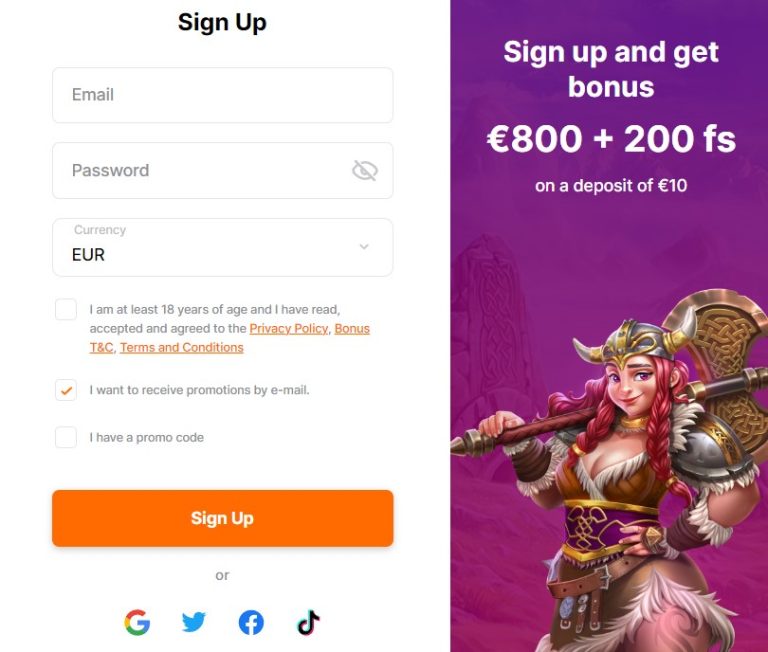
When I first arrive at a sign-up page, I see a sequence of fields that look simple on the surface. That simplicity is deliberate. Every entry field I encounter has been crafted to reduce friction while capturing essential identity markers. The form typically requests my full legal name, a valid email address, a secure password, and my date of birth. These four pieces form the foundational identity record.
Behind the interface, the system immediately runs validation scripts. If I mistype my email format or establish a password that is too short, the inline error message appears prior to me hitting submit. Real-time feedback stop me from submitting junk data. The platform checks against my IP address against my chosen currency to highlight any immediate geographical inconsistencies that could cause payment issues later.
I also note that the password strength meter is not just a visual gimmick. It actively checks for entropy, dictionary words, and breached password databases. If I attempt to use a compromised password, the system blocks it silently on the server side. This protects my account from credential-stuffing attacks even before the account is created. The registration tool is my first shield against future intrusion.
Session Surveillance and Irregularity Detection
After I authenticate, the account tools do not stop working. A background risk engine continuously evaluates my session behavior. It builds a baseline of my typical device, geographic location, screen resolution, and even typing cadence. If a login suddenly comes from a different continent with a different operating system, the engine attributes a risk score to that session.
When the risk score exceeds a predefined threshold, the system activates a silent challenge. I might be prompted to re-enter my password or complete a two-factor push notification. If I fail the challenge, the session stops and the account enters a temporary lockdown. Simultaneously, I am sent an email alert about the suspicious activity. This real-time interception often stops account takeover attempts before any funds move.
I also notice that the platform follows in-session transaction patterns. A sudden spike in deposit frequency or an attempt to modify the registered email address mid-session triggers immediate flags. The tool applies cooling-off periods for sensitive profile modifications. Even if a hijacker bypasses the login gate, the internal monitoring generates a hostile environment for fraudulent actions, affording time for the real owner to act.
Know Your Customer Verification and Record Processing
When I get to the withdrawal phase, the account tools move from identity authentication to regulatory compliance. Know Your Customer protocols mandate me to submit government-issued identification, proof of address, and sometimes a selfie with the document. The upload widget handles encrypted file transfers directly to a segregated compliance server. My sensitive documents do not mingle with general gaming data.
Optical character recognition software reads my name, date of birth, and document number automatically. The system contrasts these extracted fields against my registration data. A mismatch activates a manual review queue. If everything aligns, the tool screens the document against global sanction lists and politically exposed person databases. This screening happens in seconds, but it fulfills anti-money laundering obligations that ensure the platform legally operational.
I find the liveness detection step particularly clever. When I snap the verification selfie, the tool examines micro-expressions and depth mapping to confirm I am a genuine person holding the document, not a static photo held in front of the camera. The software checks for inconsistent lighting, edge artifacts, and screen moiré patterns. This stops bad actors from bypassing identity checks with printed photos or digital displays.
How Confirming Your Email Closes the Identity Loop
Once I submit the form, the system does not trust me right away. I obtain an automated email with a unique, time-sensitive token. This token is usually a cryptographic hash linked to my pending account record. The instant I click that link, the server executes a match operation that transforms my account status from unverified to active in the database.
I realize that this step serves multiple purposes simultaneously. It proves I control the email address I supplied, which is critical for password recovery. It also serves as a bot deterrent. Automated scripts find it hard to scan inboxes and click unique links within a narrow expiration window. If I skip the email, the incomplete registration record gets removed automatically after spiegel.de a set period, keeping the user database clean.
The verification link also triggers a background security log. The platform captures the exact timestamp, browser fingerprint, and IP address of the verification event. If I later claim my account was hijacked, the support team can compare the original verification fingerprint against the suspicious login attempt. This chain of custody makes social engineering attacks significantly harder to execute successfully.